How to Dial a Phone Number with Letters? Complete Keypad Guide
You see a number on a billboard or an ad: 1-800-FLOWERS. But your dialer only takes digits. So what do you actually press?
This confuses a lot of people, especially since phones don’t have a way to type letters directly into a call field. The good news is that once you understand the keypad mapping, dialing any number with letters becomes easy.
This guide covers what these numbers are, the full letter-to-number chart, and exact steps for iPhone, Android, and landlines.
What Is a Phone Number with Letters?
A phone number with letters is usually called a vanity number or a phoneword. Instead of a random string of digits, it spells out a word using the letters printed on a phone keypad.
Businesses use these because people remember words far more easily than long strings of numbers. A random 10-digit number is forgettable. A number like 1-800-CONTACTS sticks in your head.
Common Examples
Some well-known vanity numbers include:
- 1-800-FLOWERS (flower delivery)
- 1-800-CONTACTS (contact lenses)
- 1-800-GOT-JUNK (junk removal)
- 1-877-CASH-NOW (structured settlements)
Each of these spells a word, but every letter is quietly standing in for a digit.
Full Keypad Letter-to-Number Chart
Every phone keypad, from old landlines to modern smartphones, follows the same standard.
Each digit from 2 to 9 has a set of letters attached to it. The digits 0 and 1 don’t have any letters.
| Number | Letters |
| 2 | A, B, C |
| 3 | D, E, F |
| 4 | G, H, I |
| 5 | J, K, L |
| 6 | M, N, O |
| 7 | P, Q, R, S |
| 8 | T, U, V |
| 9 | W, X, Y, Z |
Why This Standard Exists
This mapping isn’t random. It comes from an international standard called ITU-T E.161, which defines how letters and digits are arranged on telephone keypads and rotary dials. It’s the same standard used worldwide, which is why a vanity number works the same way whether you’re calling from the US, Canada, or most other countries.
Interestingly, Q and Z weren’t part of the original layout. They were added to the standard in a 1995 revision, with Q placed on the 7 key and Z placed on the 9 key, largely because of the growing use of text messaging at the time.
A Faster Option: Online Letter-to-Number Converters
If you don’t want to work out the digits yourself, you can use a free online phone letter-to-number converter. Type or paste the vanity number in, and it instantly gives you the dialable digits using the same E.161 mapping. This is useful if you’re converting several numbers at once or just want to double-check your own conversion.
How to Dial a Number with Letters on iPhone?
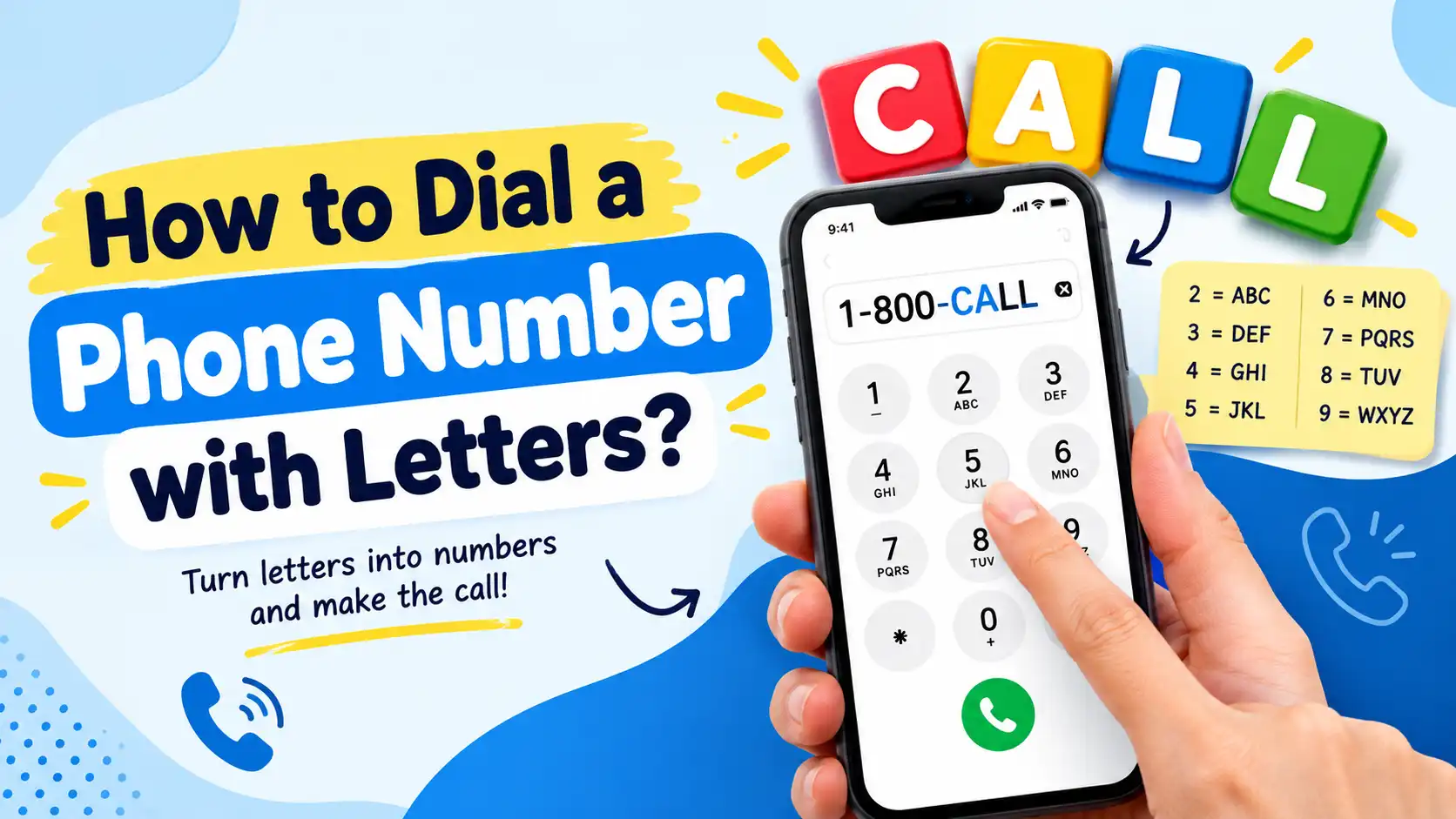
The iPhone’s dialer doesn’t have a way to type letters directly. You need to convert the letters to numbers yourself using the letters already printed on the keypad.
- Open the Phone app.
- Tap the Keypad tab.
- Look at the letters printed under each number key (2 through 9).
- For each letter in the vanity number, press the number key it appears under.
- Once you’ve entered the full sequence, tap the green Call button.
For example, to dial 1-800-FLOWERS, you’d press 1-800-356-9377.
How to Dial a Number with Letters on Android?
Android works the same way. There’s no dedicated letter mode in the dialer, so you convert the word to digits using the keypad’s letter groupings.
- Open the Phone app.
- Tap the dial pad or Keypad icon.
- Check the letters listed below each number key.
- Press the number that matches each letter in the vanity number, in order.
- Tap the call button to dial.
The layout and button placement can look slightly different depending on your phone’s brand (Samsung, Pixel, OnePlus, etc.), but the letter-to-number mapping itself stays the same.
How to Dial a Number with Letters on a Landline or Basic Phone?
Landlines and basic phones follow the exact same standard, since the ITU-T E.161 mapping applies to virtually all telephone keypads, old or new.
- Look at the letters printed on each number button (usually 2 through 9).
- Convert each letter in the vanity number to its matching digit.
- Dial the full numeric sequence as you normally would.
There’s no shortcut here since basic phones don’t support copy-paste or converter apps. Manually working out the digits (or converting them beforehand using a converter tool or the chart above) is the only option.
Common Mistakes to Avoid
A few small errors can cause a call to fail or connect to the wrong number:
- Using alphabet position instead of the keypad mapping. Some people assume A=1, B=2, and so on. That’s incorrect. The keypad mapping is what matters, not alphabetical order.
- Confusing similar-looking letters and numbers. O and 0, or I and 1, are easy to mix up. Double-check each character.
- Leaving in spaces or special characters. Dashes are usually fine to skip, but stray symbols can cause dialing errors.
- Typing letters directly into the dial field. Most dialers won’t accept letters at all — you need to enter the numeric equivalent instead.
- Forgetting the area code or prefix. Vanity numbers still need the full number in front of the letters, like the 1-800 in 1-800-FLOWERS.
FAQs on Keypad Mapping
Q1. How to get letters when dialing?
Phone dialers don’t have a way to type letters directly. Instead, look at the letters printed under each number key (2–9) and press the number that matches the letter you need.
Q2. Can letters be in a phone number?
Yes, but only as a memorable stand-in. The actual number that gets dialed is always numeric. The letters are just a marketing tool that maps back to real digits through the standard keypad layout.
Q3. How to convert letters to numbers in a phone number?
Use the keypad chart: 2=ABC, 3=DEF, 4=GHI, 5=JKL, 6=MNO, 7=PQRS, 8=TUV, 9=WXYZ. Match each letter to its number, or use a free online converter to do it instantly.
Q4. Can a number be a letter?
Each number from 2 to 9 represents multiple letters based on the standard keypad mapping. So while a single digit isn’t literally a letter, it always corresponds to a small group of letters on the keypad.
Final Words
Dialing a phone number with letters is simple once you know the keypad mapping. Every letter from A to Z sits on a number key from 2 to 9, and that layout is the same on iPhones, Android phones, and landlines.
If you’re ever unsure, the fastest fix is to use an online letter-to-number converter or keep the chart above handy. Either way, you’ll never have to guess your way through a vanity number again.
Read More : What Is a VoIP Caller? Everything You Need to Know